Automation·terminal · desktop·MIT
sleight
Claude drives Mac apps behind your windows with the ChatGPT app's computer-use engine.
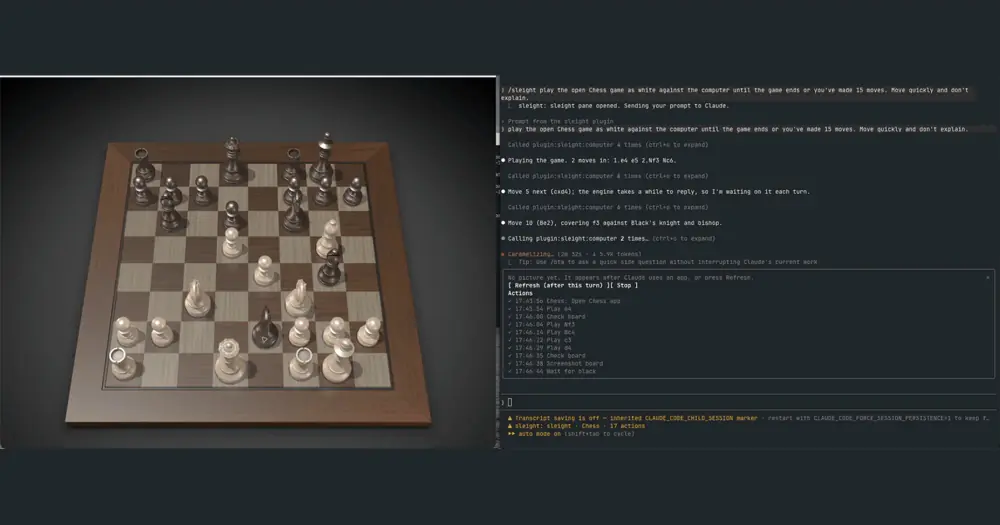
sleight lets Claude Code operate the native apps on your Mac without taking over your screen. It hands Claude the computer-use engine bundled with the ChatGPT desktop app, which sends clicks, keystrokes and drags straight to the target app, even behind your other windows, so you keep using the Mac while Claude works. It is unofficial: neither OpenAI nor Anthropic supports it, and a ChatGPT update can break it.
The author’s recording, at 6× speed. Every move is a drag.
What it does
- Reads more than screenshots. Claude gets each app’s accessibility tree as well as screenshots, and after each action only what changed. In the author’s test, five scrolls down a news front page sent 39,655 characters instead of 203,160.
- Asks once per app. The first time Claude touches an app, you approve it for the session: through a Claude Code prompt in the terminal, through sleight’s own panel in the desktop app’s Code tab. Apps you set to “Always allow” in Codex or ChatGPT pass without asking. Terminals and OpenAI’s apps stay off until you opt in, and sleight shows you each terminal command first unless you turn that off.
- Shares one Mac between sessions. Input leases give one session a window at a time and tell the others who holds it.
- Refuses stale clicks. When a window’s element numbers shift, sleight blocks actions on numbers Claude hasn’t seen since.
- Goes past the engine. It drags text, which the engine’s own drag can’t move, and reaches menu bar icons and notification banners, each with its own approval.
- Lets you watch and stop it.
/sleightopens a pane with the app’s latest picture (colored half-blocks in a terminal, the screenshot itself in the Code tab) and a log of every action. Text after the command goes to Claude as a prompt:/sleight play chess in the background. The status line names the app and counts the actions./sleight stop, orsin the pane, refuses every sleight call until your next message; press Esc as well to end Claude’s turn. - Replays a run.
sleight-mcp recordturns a finished session into a task file thatsleight-mcp replayruns again with no model, through the same guards.
Claude Code’s own computer use, as the author reads Anthropic’s documentation, hides your other apps while Claude works, serves one session at a time and sees only screenshots, but Anthropic supports it. codex-computer-use uses the same ChatGPT engine through a bridge daemon installed by a setup script, and blocks Claude’s own computer-use tools while it is on; sleight needs only the two marketplace commands and leaves those tools alone.
Install
Needs Claude Code 2.1.287 or later, plus macOS on Apple Silicon and the ChatGPT desktop app with Computer Use turned on in Codex and used for at least one task. That first run installs the engine’s helper and gets macOS to grant it Accessibility and Screen Recording. You can sign out of Codex afterwards.
claude plugin marketplace add Land-o-Clusters/sleight
claude plugin install sleight@sleight
Start a new session, then check the engine:
~/.claude/plugins/marketplaces/sleight/plugins/sleight/bin/sleight-mcp --doctorThen ask Claude to use sleight on an app, for example to work out a sum by clicking Calculator’s buttons in the background.
How it works
The plugin declares an MCP server, computer, whose command is a launcher and relay in the plugin’s bin folder. It contains no OpenAI code: it starts the computer-use runtime already installed with the ChatGPT app and passes Claude’s calls to it, with the session and turn ids the engine uses to scope approvals and cleanup. The main tool, js, runs JavaScript in the engine’s session to open an app, read its state, click, type or take a screenshot. A bundled skill, delivered with the engine’s first result, tells Claude when to use sleight and when to fall back to a tool that moves the pointer.
The macOS permissions, Accessibility and Screen Recording, belong to the engine’s helper, not to Claude Code; the per-app approvals sit on top. js runs JavaScript as you, so the author says to treat it like Bash: Claude Code asks before each call unless you allow mcp__plugin_sleight_computer__js, and allowing it lets Claude send any code without asking.
A few fallbacks take your pointer for a moment: the foreground drag, hover and the menu bar fallback for SwiftUI icons. Each asks first and waits until you have stopped typing and using the mouse for two seconds.
The mod’s hooks touch only sleight’s own tools. On each js call, it reads the code to see which app it targets and logs the call’s title for the pane. When a turn that used sleight ends, it refreshes the pane’s picture if the pane is open, then tells the engine the turn is over so it releases what it holds. Its tool.check hook lets only those two calls of its own through in Auto mode. The pane waits for the turn to end because the engine diffs against the latest read of an app, whoever made it; if the pane read an app in between, your next prompt carries a short note telling Claude to take a full read.
The mod makes no network calls. What Claude reads, accessibility diffs and screenshots, comes back as tool results and goes to the model with the rest of the conversation. The README doesn’t say whether the ChatGPT engine contacts OpenAI while sleight uses it.
Limitations
- macOS on Apple Silicon only. A Windows port is on the roadmap, unchecked.
- It drives an undocumented runtime, so a ChatGPT update can break it. Most fixes start with
--doctor, and a stuck engine read can need a ChatGPT restart, which ends your Codex sessions. - The apps stay out of sight, and the pane’s picture refreshes only after a turn that used sleight, or on Refresh while Claude is idle.
- The author hasn’t yet checked
/sleight stopin the desktop app’s Code tab. - The benchmark is published with its failures. Release 1.1.0 passed 20 of 21 runs across Calculator, TextEdit, Chess and an iPhone simulator, and sleight lost a Chess head-to-head against Codex’s own computer use, 0 of 3 to 2 of 3.
Similar Claude Mods
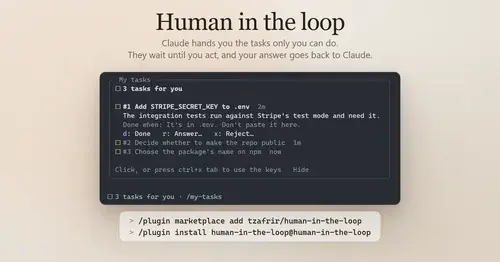
Human in the loop
Claude assigns you what only you can do. Tasks wait in a pane until you answer.

threads
Spin up Claude sessions on other models, watch them in a pane, get their answers back.

hope
Judges each turn's edits for slop; accept, edit or reject every finding.

fixkit
Long press a UI bug in your iOS app in the simulator and Claude Code gets the report.
Popular Claude Mods
The whole directory →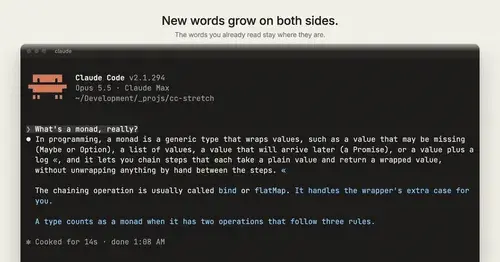
cc-stretch
Replies arrive short; click a phrase and it grows in place, click « to fold it back.
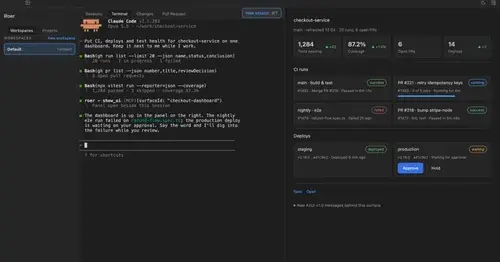
roer-ui
Claude draws forms, dashboards, tables and diffs you can click, in a pane. From JetBrains.

storybloq
A board of the tickets and issues kept in .story/, in a pane beside the transcript.
Fanyi
Write in your language; Claude works in English and each reply is translated underneath.