Dashboards·terminal·MIT (declared in the README, no LICENSE file)
context-lens
Window fill, growth per turn and turns left before compaction, pinned under the prompt.
context-lens keeps the figures from /context on screen instead of making you ask for them. A line pinned under the Claude Code prompt shows how full the context window is, what the last turn added and how many turns fit before auto-compaction runs. /context-lens opens a pane with the window broken down by category.
What it does
- The pinned line updates after every turn: percent used, tokens against the window size, what the last turn added, and how many more turns fit at the recent average growth. A figure the engine has not reported yet is left out rather than guessed.
- The pane draws one bar per category (messages, system tools, memory files, system prompt, the auto-compaction buffer, free space), then the growth per turn, the headroom in turns and tokens, the limit that headroom is measured against, and whether the count is an estimate. Run
/context-lensagain to close it. /context-lens refreshcounts every category with the token-count API, the way/contextdoes, and the pane’scountedrow says so.- After a compaction or
/clearthe line says it is waiting for the next answer and the growth history restarts, because the window it measured no longer exists.
Install
Needs Claude Code 2.1.269 or later with function hooks enabled. The per-category bars need 2.1.272 or later: on 2.1.270 and earlier the pane draws the window bar alone, says so in place of the category rows, and measures headroom against the whole window.
claude plugin marketplace add Arunjay4213/claude-mods
claude plugin install context-lens@claude-mods
claude-mods is the name of the author’s marketplace and has no relation to this site. The same marketplace carries the author’s quota-meter and token-ledger. The line is pinned from the moment the session starts, reading ctx waiting for the first answer until Claude replies. Run /context-lens to open the pane.
How it works
Every reading is one call to $.session.usage. After each finished turn the mod asks for the summary breakdown, which the engine estimates locally and sends no requests for, so the line costs nothing. /context-lens refresh asks for the full breakdown, and the engine then sends one token-count request per tool and memory file. That is the only thing in the mod that spends anything, and it only runs when you ask.
The headroom is measured against the engine’s own auto-compaction threshold when the breakdown reports one, against the compaction window when auto-compaction is off, and against the whole context window when there is no breakdown at all. The pane’s limit row says which.
The growth figures come from an in-memory list of the token count after each turn, at most 24 entries, cleared by a compaction or /clear. Subagent turns are skipped, since they run over their own window. Nothing is written to the plugin store or to disk, and the mod makes no network calls of its own.
Limitations
- The token count comes from the last API response, so a fresh or just-compacted session has no reading until its next answer.
- The turns estimate is a straight line through the recent turns that grew. One large file read moves it a long way, so it is a rough guide, not a forecast.
- The engine places the pane: docked beside the transcript in the fullscreen layout from 110 columns, inline above the prompt otherwise. Inline it gets about a third of the screen, so a long category list scrolls.
- The engine allows one pinned line per plugin and draws it with its own notice mark.
- Draws only in interactive terminal sessions.
More mods
The whole directory →
agent-flow
Every subagent of the session in a live tree beside the transcript. Zero tokens.
claude plugin install agent-flow@claude-agent-flow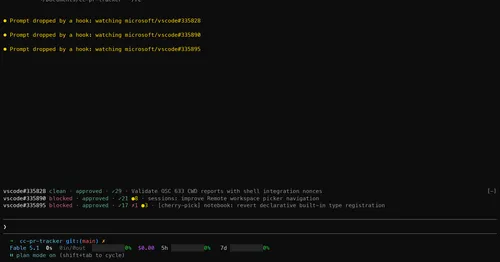
cc-pr-tracker
Merge state, review and checks of your PRs on one line above the prompt, with alerts.
claude plugin install cc-pr-tracker@cc-pr-tracker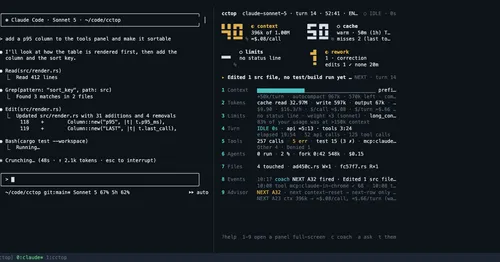
cctop
Context, cost, rate limits and tool stats of the session, live in a side pane.
claude plugin install cctop@cctopgh-ci-status
Your repo's GitHub Actions runs pinned above the prompt, with links and toasts.
claude plugin install gh-ci-status@claude-function-hooks